.png)
Detection Engineering
Introduction
I initially wanted to start this project to get a feel for creating detections and how detections actually work. I fell in love with the craft. As someone who really couldn’t decide which aspect of security I enjoyed more, offensive or defensive, I thought detection engineering was the perfect middle point where I could continue to build my knowledge on both ends and use it to make a valuable impact within an organization. I grew more and more fascinated through my research and my constant feeling to dig deeper and ask more questions. I hope to use the lab I’ve created to dive deeper into building detections for more complex attacks and give real insights into how others can build something similar or use my work as a reference point to build off. Starting off my cybersecurity journey doing HackTheBox and offensive security labs, Impacket is something I was introduced to very early on. Because of how commonly it appears in real adversarial scenarios, I decided to focus this project on understanding how several Impacket lateral movement techniques work and how reliable detections can be built for them. The goal of this project was to break down the underlying behavior of these techniques, identify the artifacts they produce, and develop detections based on those behaviors.
What is Detection Engineering?
Detection engineering is the process of designing reliable, high-fidelity alerts that identify malicious behavior within an environment. Unlike simple signature-based monitoring, effective detections must balance:
-
Precision (minimizing false positives): The detection should trigger on true malicious behavior and avoid flagging normal admin activity.
-
Coverage (sufficient visibility): The detection is only as strong as the telemetry and environment scope it can see, so it should be built around reliable log sources and meaningful visibility into the behavior.
-
Durability (resilience to tool modification): The logic should target the underlying attacker capability and artifacts, not brittle tool-specific strings that are easy to change.
-
Operational context (aligned with expected behavior): The rule should reflect what “normal” looks like in the environment, including allowlists, baselines, and known administrative tasks.
Security teams heavily rely on detections to surface activity in near real time. Poorly engineered detections can create what is known as “alert fatigue”. Overly narrow or brittle detections can miss adversaries.
Methodology
For each technique discussed in this project, I followed a structured methodology:
-
What is the attack?
-
Research the TTP to understand the core capability being exercised
-
Determine artifacts that are created that can potentially be used to detect TTP’s core capability
-
Contextualize events to increase alert fidelity
-
Validate, tune, and repeat until alert is stable
This methodology focuses on durable TTP behaviors that remain invariant across implementations.
Capability Abstraction
Modern detections should not focus on tool names but rather specific tool implementations. Multiple tools can implement the same underlying behavior. For example:
psexecsmbexecSysinternals psexecMetasploit service execution modules
All of these provide the capability to execute commands remotely via the Service Control Manager (SCM) and over SMB.
This concept aligns with SpecterOps’ discussion of capability abstraction, particularly in Jared Atkinson’s work on detection behaviors at different layers. Throughout this project, I focus on identifying lower-layer behaviors such as:
- Service creation via SCM
- Registry modifications under
HKLM\System\CurrentControlSet\Services - Administrative share access (
ADMIN$,C$) - Parent-child process relationships
By detecting at this layer, detections remain effective even if an attacker decides to modify service names, binary names, or tool flags.
Detection Environment
All detections in this project were developed and tested in a lab I built using Sysmon telemetry and native Windows event logs. Logs were ingested into ELK Stack and detection logic is written using Elastic EQL.
This context is important, as field names and query syntax may differ across SIEM platforms.
What is Impacket?
Since the main topic of this blog is diving into Impacket lateral movement techniques and how to detect its usage, I feel that I should start with an overview of what Impacket actually is.
Impacket is an open-source Python toolkit that attackers commonly use to abuse Windows and Active Directory protocols for lateral movement, credential access, and domain control. Rather than relying on exploits, Impacket operates by interacting directly with legitimate Microsoft protocols, allowing malicious activity to blend in with normal administrative behavior.
Because these techniques mirror how Windows networks actually function, Impacket is frequently observed in real-world intrusions, ransomware campaigns, and post-exploitation frameworks. Red Canary has consistently noted Impacket as a top 10 threat, as well as some of the techniques I will be covering later, in the top 10 common techniques used by adversaries.
2023 Red Canary Report
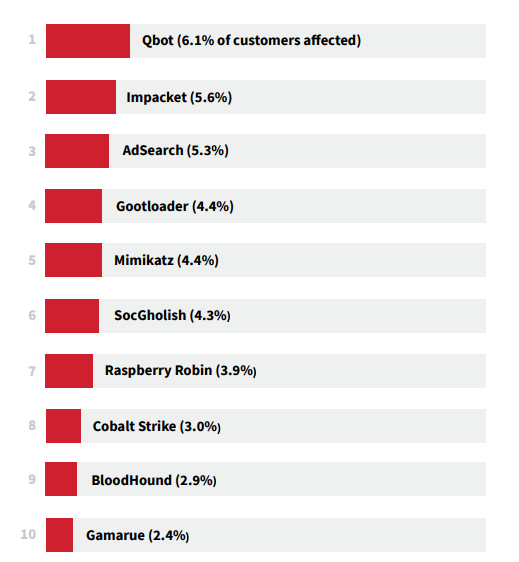
Top 10 cyber threats Red Canary detected most frequently across customer environments in 2023
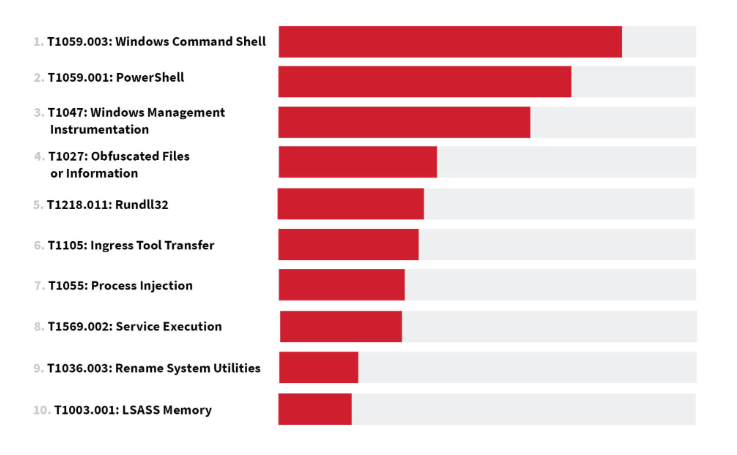
Top 10 ATT&CK techniques Red Canary observed most frequently across customer environments in 2023
2024 Red Canary Report
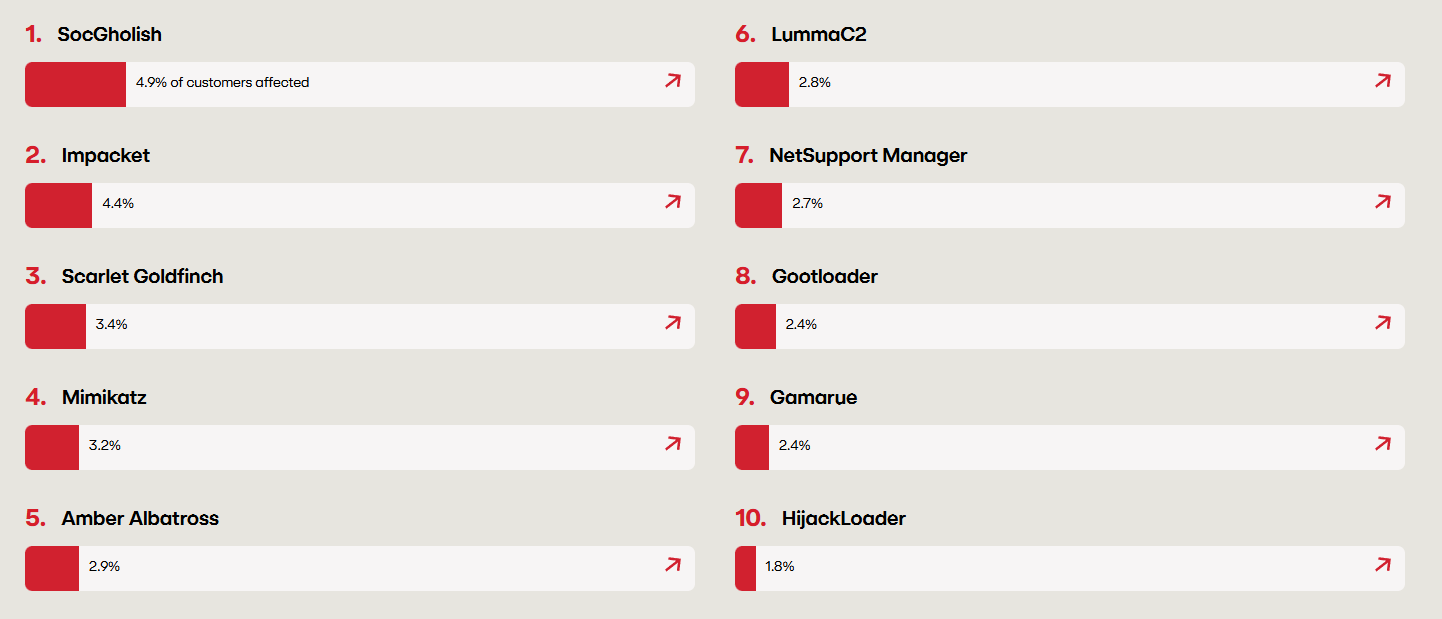
Top 10 cyber threats Red Canary detected most frequently across customer environments in 2024
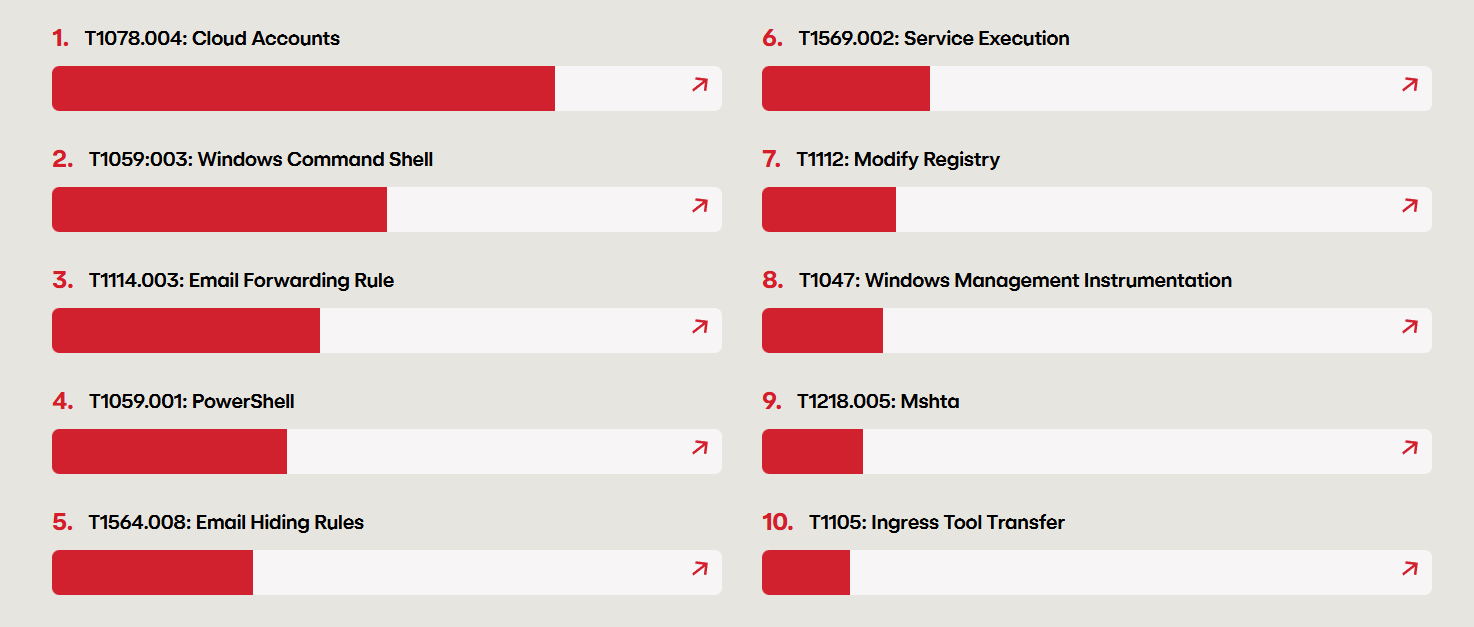
Top 10 ATT&CK techniques Red Canary observed most frequently across customer environments in 2024
How Adversaries Use Impacket
Adversaries typically introduce Impacket after initial access, when credentials or a foothold inside a Windows environment have already been obtained. From there, the toolkit is used to expand access, escalate privileges, and move laterally across the domain.
Notable Tools in the Suite
Remote Execution Utilities
-
psexec.pyuploads a temporary service binary to the victim, registers it as a Windows service, and communicates over a named-pipe to provide a “shell-like” experience over SMB -
wmiexec.pyexecutes commands via Windows Management Instrumentation -
smbexec.pywhile also leveraging the Windows SCM, executes a cmd.exe process via a temporary service and retrieves output through administrative share file writes -
atexec.pyexecutes commands using scheduled tasks
Both psexec.py and smbexec.py rely on the Windows Service Control Manager for remote execution. The primary distinction between the two is that psexec uploads a service binary and communicates over a pipe, while smbexec leverages native Windows binaries and uses a file-based output retrieval.
Credential and Directory Access
secretsdump.pyextracts credential material from local SAM databases, domain-joined systems, or domain controllers via NTDS replication.GetUserSPNs.pyenumerates Service Principal Names (SPNs) in a domain and can request Kerberos service tickets (TGS) for offline crackingGetNPUsers.pyidentifies accounts without Kerberos pre-authentication
Authentication Relay and Delegation
ntlmrelayx.pyrelays NTLM authentication to other servicesticketer.pyfor crafting Kerberos ticketsrbcd.pymanages resource-based constrained delegation
Wmiexec
Wmiexec Overview
Wmiexec relies on the Windows native service Windows Management Instrumentation (WMI). WMI is defined by Microsoft as “the infrastructure for management data and operations on Windows-based operating systems.” It is essentially used to automate administrative tasks on remote computers and supply management data to other parts of the operating system and products. It mainly uses the WMI class Win32_process to create processes and supply arguments, similar to running a command in a shell. Impacket’s wmiexec does exactly this. In addition, the “interactive shell” is not actually a shell in technical terms. It is essentially just execution of commands, which output gets written to a writable share and concatenated on the attacker’s machine then deleted.
Detection
Applying the Methodology
1. What is the attack?
wmiexec.py enables remote command execution via the Windows Management Instrumentation (WMI).
2. Core capability of the TTP?
The core capability is remote process creation through WMI, specifically via the Win32_Process class. This allows an attacker to execute commands on a remote host using native Windows management functionality.
3. Artifacts that are created that can be potentially be used to detect the TTP’s core capability?
To form a valuable detection, we can analyze the source code of the tools we are making them for.
class RemoteShell(cmd.Cmd):

    def __init__(self, share, win32Process, smbConnection, shell_type, silentCommand=False):
        cmd.Cmd.__init__(self)
        self.__share = share
        self.__output = '\\' + OUTPUT_FILENAME
        self.__outputBuffer = str('')
        self.__shell = 'cmd.exe /Q /c '
        self.__shell_type = shell_type
        self.__win32Process = win32Process
        self.__transferClient = smbConnection
        self.__silentCommand = silentCommand
        self.__pwd = str('C:\\')
        self.__noOutput = False
Above is lines 123-137 of the wmiexec.py source code to show a bit of how this works under the hood. In this line, it shows execution of cmd.exe with /Q /c parameters. This essentially turns off echo and stops after the command specified is carried out.
command += ' 1> ' + '\\\\127.0.0.1\\%s' % self.__share + self.__output + ' 2>&1'
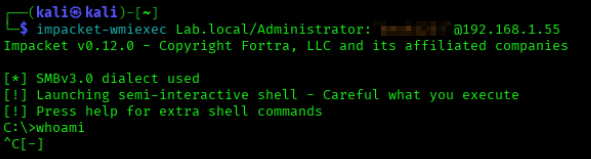
Above, line 294 shows the output being written into a writable share, usually ADMIN$. This admin share is most of the time mapped to C:\Windows\. Note that wmiexec has self clean-up implemented, so often times the share is deleted after the output has been returned to the attacker unless keyboard interruption occurs. Example:

4. Contextualize events to increase alert fidelity
For the sake of this lab, I will be referencing Sysmon telemetry (Event 1), but similar results can be gained by referencing Windows Event 4688.
Viewing Sysmon logs shows that WmiPrvSE.exe is the parent process of the cmd.exe process that gets executed when the wmiexec is run.

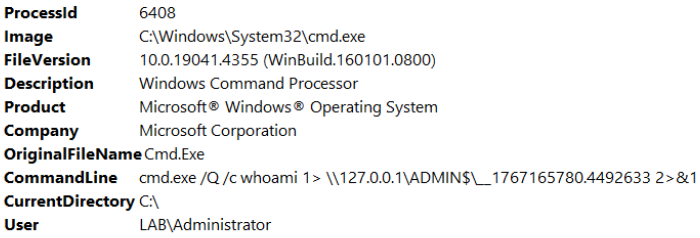
We can clearly see here the cmd.exe process being executed with the /Q /c parameters and writing to the admin share we talked about earlier.
It is also possible to set the shell type as powershell and the process spawned will be powershell.exe instead of cmd.exe. It can also be possible to run commands with noutput and have a silent command that completely avoids cmd.exe and powershell.exe and executes commands through WmiPrvSE.exe. I found it valuable to detect for suspicious script interpreters being spawned. In this case, this detection will be entirely environment-dependent and will need to monitor for suspicious processes WMI should not be spawning in any case.
5. Validate, tune, and repeat until the alert is stable
During this project, I validated this by running wmiexec multiple times and confirmed consistent parent-child behavior through Sysmon Event ID 1, then tuned the script interpreter list to reduce noise. Here is the final Elastic EQL detection I came up with to monitor for script interpreters and the suspicious flags that wmiexec is likely to come with:
process where
  host.os.type == "windows" and
  event.category == "process" and
  process.parent.name : "WmiPrvSE.exe" and
  (
    (
      process.name : "cmd.exe" and
      process.command_line : "* /Q * /c *"
    )
    or
    (
      process.name : "powershell.exe" and
      process.command_line : "*-NoP* -NoL* -sta* -NonI* -W Hidden* -Exec Bypass* -Enc*"
    )
    or
    process.name : (
      "rundll32.exe",
      "cscript.exe",
      "wscript.exe"
    )
  )
Logic Explanation
The first pieces of the detection pull logs to detect a process that is a child to a WmiPrvSE.exe process. In many cases, the child process will likely be cmd.exe or powershell.exe, which within execution, come with distinctive flags these interpreters are supplied with. This is depicted within the next set of queries. The remaining query adds additional monitoring for other known suspicious script interpreters wmiexec is commonly paired with.
Psexec
Psexec Overview
Psexec relies on the Windows Service Control Manager (SCM) and the SMB protocol to perform remote command execution. The Service Control Manager is responsible for creating and managing Windows services, a function commonly used by administrators for remote system management.
Impacket’s psexec abuses this mechanism by authenticating over SMB, writing a temporary service binary to an administrative share, and creating a new service on the target system. When the service is started, it executes arbitrary commands with SYSTEM-level privileges. Command output is returned over SMB, after which the service is removed. While effective and reliable, this technique leaves clear artifacts such as service creation events and dropped binaries.
Detection
Applying the Methodology
1. What is the attack?
psexec.py enables remote command execution via the Windows Service Control Manager (SCM) over SMB.
2. Core capability of the TTP?
After researching more into psexec, the core capability being exercised is remote command execution via Service creation and a Binary upload. The tool authenticates using valid credentials and uploads the said binary to a writeable share, usually ADMIN$ or C$, and creates a new Windows service that points to that binary, starts the service to execute commands with SYSTEM privileges. This behavior is not unique to just Impacket. Similar service-based execution techniques are implemented by Sysinternals own psexec, Metasploit modules psexec, and other offensive frameworks.
3. Artifacts that are created that can be potentially used to detect the TTP’s core capability?
Running psexec within my lab produced the following:
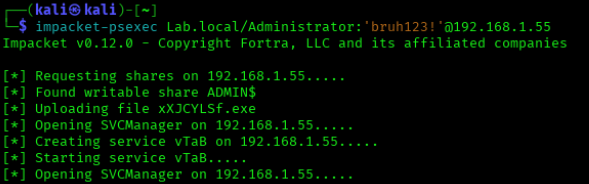
We can see a .exe file being uploaded named xXJCYLSf.exe as well as a service being created named vTaB. By default, psexec will create a random 4 character named service as well as a random 8 character named binary that is uploaded to the victim machine, as shown in the source code of Impacket’s serviceinstall.py.
class ServiceInstall:
    def __init__(self, SMBObject, exeFile, serviceName="", binary_service_name=None):
        self._rpctransport = 0
        self._service_name = serviceName if len(serviceName) > 0 else ''.join([random.choice(string.ascii_letters) for i in range(4)])
        if binary_service_name is None:
            self._binary_service_name = ''.join([random.choice(string.ascii_letters) for i in range(8)]) + '.exe'
        else:
            self._binary_service_name = binary_service_name
        self._exeFile = exeFile
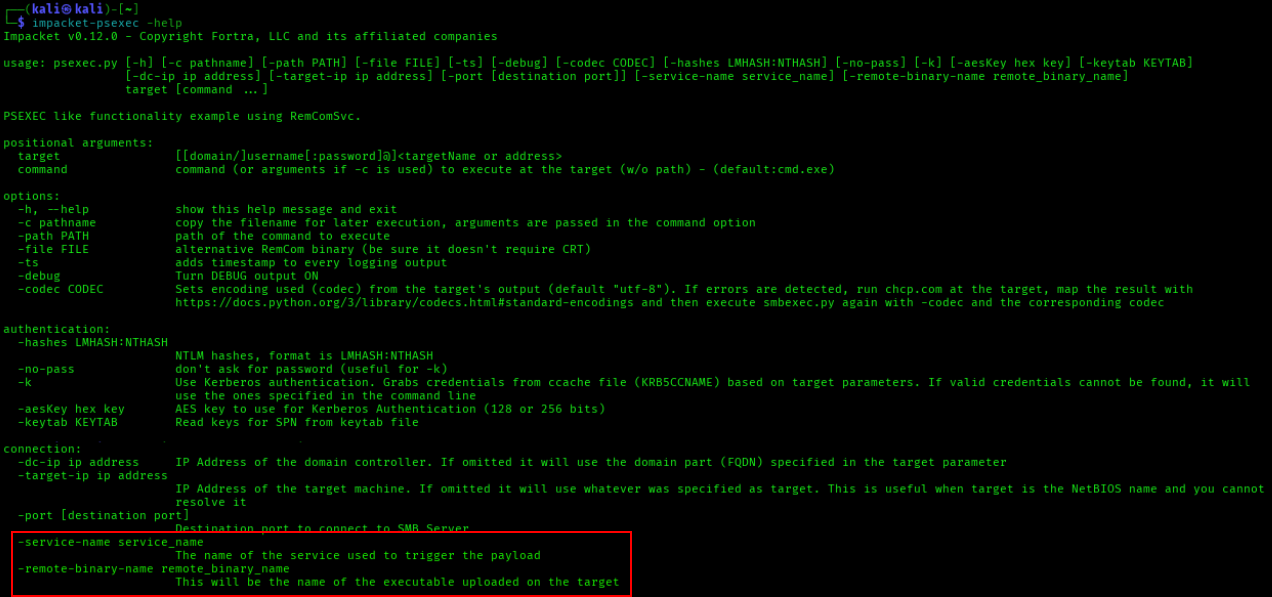
It could be a good indication to create detections using this behavior, but these names can easily be changed by attackers as per the -service-name and -remote-binary-name flags psexec offers.
4. Contextualize events to increase alert fidelity
I based my detection on the binary upload and service creation themselves. I decided to correlate them in a sequence and add a timespan of the two being done within 5 minutes.
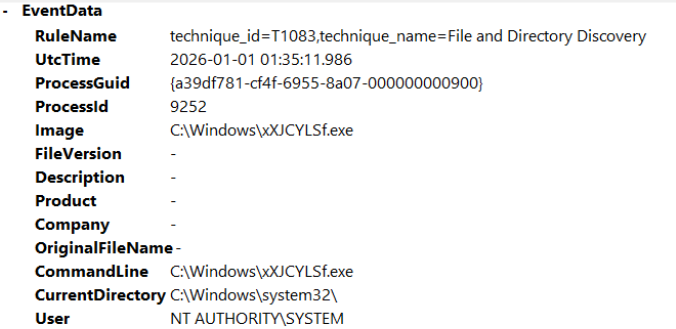
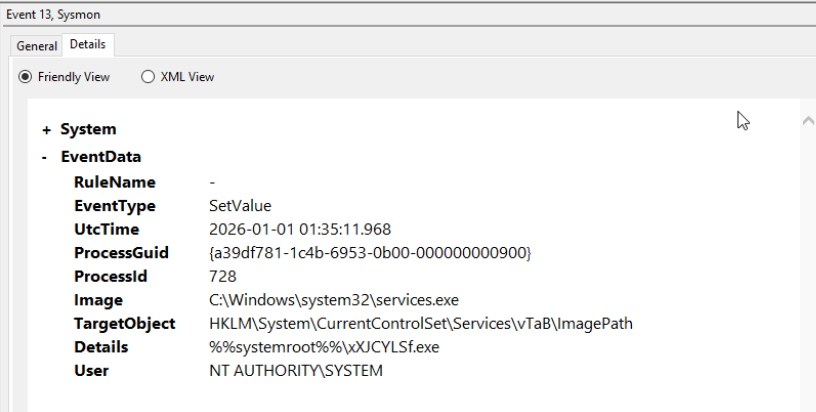
We can see the service creation is tied to the same binary executable that gets uploaded. We can use this correlation in our detection to decrease the likelihood of false positives.
In addition, we can also monitor for 5145 events to see an SMB share getting accessed. The usual target share for psexec is either ADMIN$ or C$.
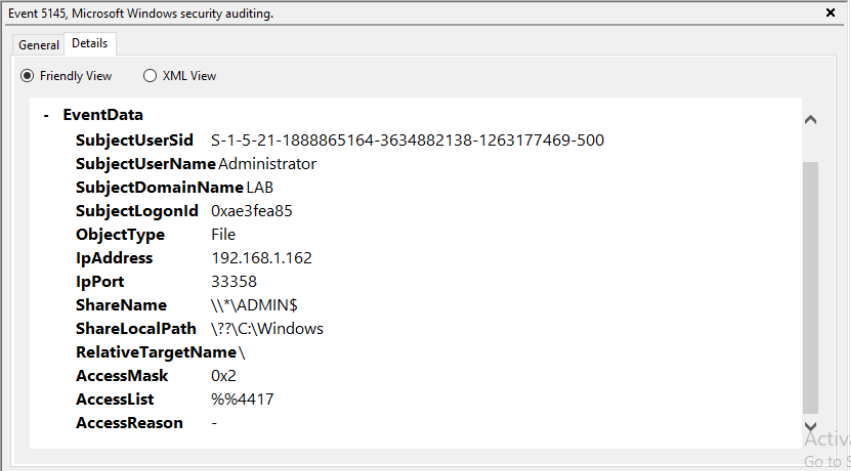
We also get the source IP address, so I found it beneficial to include this in the detection. For my case, I thought it would be wise to include a whitelist of “known administrative server IPs”. Putting this all together, we conclude with the final detection for psexec:
5. Validate, tune, repeat until alert is stable
For this detection, I repeatedly executed psexec in my lab to confirm the consistency of key artifacts. Each run consistently generated Event ID 5145 write activity to an administrative share, creation of an executable on disk, and a corresponding service registry entry under HKLM\System\CurrentControlSet\Services\. I verified that these artifacts occurred within a short and predictable time window.
I tuned the correlation window to 5 minutes to balance detection reliability and noise reduction. This time-based correlation not only improves fidelity but also provides resilience in the event an adversary attempts to introduce slight delays between stages of the attack to reduce immediate detection. The Elastic EQL detection rule is below:
sequence by host.name with maxspan=5m
  [any where
    host.os.type == "windows" and
    event.code == "5145" and
    (
      winlog.event_data.ShareName like "\\\\*\\ADMIN$" or
      winlog.event_data.ShareName like "\\\\*\\C$"
    ) and
    (
      file.name like "*.exe" or
      winlog.event_data.RelativeTargetName like "*.exe"
    ) and
    (
      winlog.event_data.AccessMask in ("0x2", "0x00000002") or
      winlog.event_data.AccessList == "%%4417"
    ) and
      source.ip != null and
      source.ip != "192.168.1.160"
  ]
  [file where
    host.os.type == "windows" and
    event.category == "file" and
    event.type in ("creation","change") and
    file.extension == "exe" and
    file.name != null
  ]
  [registry where
    host.os.type == "windows" and
    event.category == "registry" and
    registry.path like "*\\System\\CurrentControlSet\\Services\\*\\ImagePath"
  ]
Logic Explanation
Within this detection, I introduced a max timespan with the line sequence by host.name with maxspan=5m, which looks for all these events within a 5 minute window. Next, I added a query monitoring for the 5145 event mentioned earlier, looking particularly for C$ or ADMIN$ share writes. I also added queries for the uploaded .exe file being the RelativeTargetName within the EventData. The AccessMask and AccessList “0x2” and “%%4417” correspond to a file write. I also decided to include an IP whitelist, seen with the 192.168.1.160 IP acting as an “administrative” IP in this environment. Next, I monitored for the .exe upload as previously mentioned and the service registry entry. When psexec creates a new service, it writes a registry entry specifying the path to the uploaded executable. Monitoring for this path captures service creation behavior regardless of service or binary name changes.
Smbexec
Smbexec Overview
Impacket’s smbexec also leverages the SMB protocol for remote command execution, but instead of uploading a standalone service binary like psexec, it uses a more fileless-style approach that relies on Windows command execution through the Service Control Manager (SCM).
Smbexec authenticates to the target system over SMB using valid credentials or hashes and interacts with the Service Control Manager to create a temporary service. However, rather than writing a custom executable to disk, it configures the service to execute cmd.exe directly. The command passed to the service typically echoes instructions into a temporary batch file on an administrative share (such as C$ or ADMIN$), executes that batch file, redirects the output to a file on the share, and then deletes the batch file afterward. The attacker then retrieves the command output over SMB. Once execution is complete, the temporary service is removed.
Because smbexec relies heavily on native Windows binaries like cmd.exe and administrative shares, it blends more closely with legitimate administrative activity. However, it still produces strong artifacts. These include service creation events, process creation events where services.exe spawns cmd.exe, file write and delete activity on administrative shares (e.g., Event ID 5145 with access masks such as 0x2 for write), and short-lived batch files in C:\Windows\Temp or similar directories. While it avoids dropping a persistent executable like psexec, its chained command execution, temporary file creation, and rapid service life, provide clear detection opportunities in well-instrumented environments.
Detection
Applying the Methodology
1. What is the attack?
Smbexec enables remote command execution via the SCM over SMB, but instead of uploading a standalone service binary like psexec, it dynamically creates and executes commands through native Windows binaries such as cmd.exe.
2. Core capability of the TTP?
Through research, I discovered that the core capability of smbexec is essentially the remote command execution via temporary service creation and command execution through native binaries. The tool authenticates over SMB, creates a temporary Windows service, configures that service to execute cmd.exe, writes attacker-supplied commands into a temporary .bat file on a writeable share (commonly ADMIN$ or C$), executes that batch file, and retrieves the output over SMB, and deletes the artifacts afterwards.
Although it avoids uploading a custom executable, the fundamental behavior is still service-based remote execution. This makes it behaviorally similar to psexec, even though the implementation details differ.
3. Artifacts that are created that can potentially be used to detect the TTP’s core capability?
My strategy for smbexec was honestly very similar to psexec, since the behavior of the tools is the same but different. After running smbexec within the lab, the following telemetry was produced.

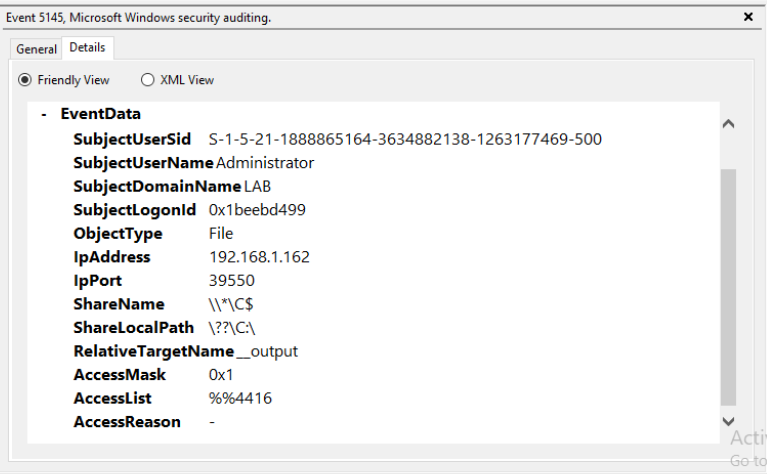
Here we can see the accessing of the file share originating from the Kali Machine (192.168.1.162). Similar to psexec, a writeable share is accessed, in this case C$.
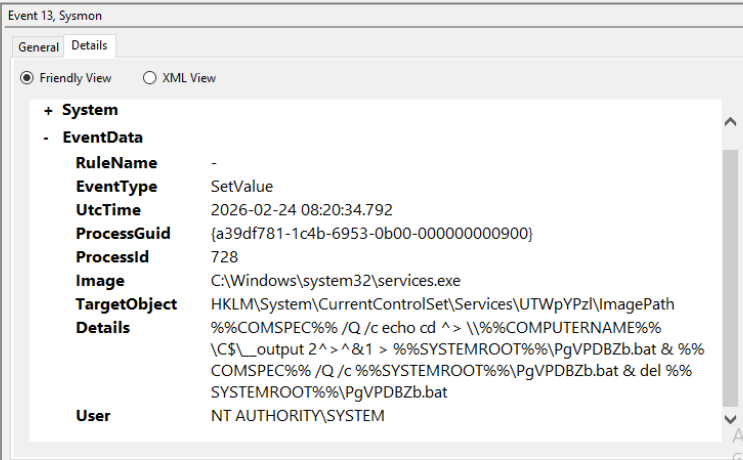
In the screenshot above we can see the service registry entry with the service creation under HKLM\System\CurrentControlSet\Services\<ServiceName>\ImagePath\. Unlike traditional services that point directly to a static executable (e.g.,svchost.exe), smbexec configures the ImagePath value to execute cmd.exe with a chained set of commands. This is valid behavior for the SCM, which accepts any executable and supplied arguments. By embedding a command chain directly within ImagePath, smbexec avoids dropping a standalone binary and instead performs execution, output redirection, and cleanup in a single service start operation.
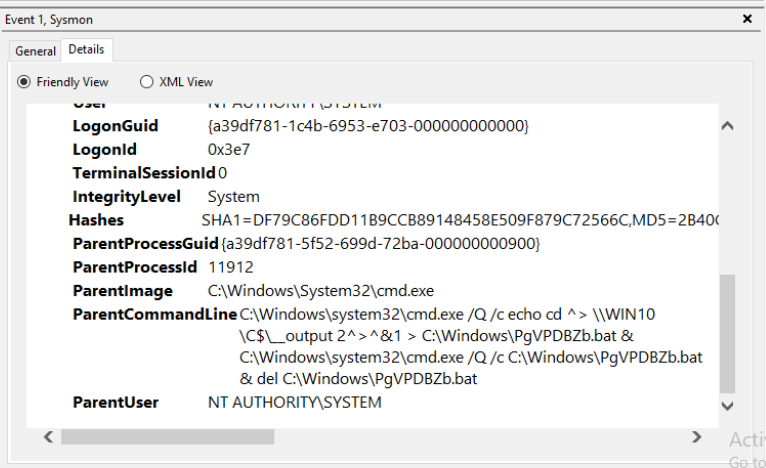
In the screenshot above, we can see the functionality we just discussed in clearer text. An initial cmd.exe process is spawned and echoes instructions into a .bat file. Another cmd.exe process is spawned to run that batch script and delete it afterwards, all done when the registered service starts.
4. Contextualize events to increase alert fidelity
To increase fidelity, I correlated multiple artifacts together that model the execution chain of smbexec rather than relying on singular artifacts. I focused on the sequence of service creation, temporary batch file creation, and SMB share interactions. Specifically, I correlated a registry modification under HKLM\System\CurrentControlSet\Services\<ServiceName>\ImagePath, creation of a .bat file under C:\Windows\, and Event ID 5145 activity against writable shares such as ADMIN$ or C$. I also included AccessMask values (0x1, 0x2, 0x10080) to capture read, write, and delete operations consistent with command output retrieval and cleanup. By sequencing these behaviors within a short one-minute window, the detection is effective against the rapidness of smbexec and significantly reduces the likelihood of false positives.
5. Validate, tune, repeat until alert is stable
To validate this detection, I, once again, repeatedly executed smbexec within my lab and monitored the consistency of the correlated articfacts. Each execution reliably generated a registry modification, creation of a temporary .bat file within C:\Windows\, and Event 5145 activity reflecting read, write, and delete operations on accessible shares.
I tuned the correlation window to 1 minute to accurately reflect the rapid execution lifecycle of smbexec, where service creation, command execution, output retrieval, and cleanup happen almost immediately. This shorter window improves precision while still allowing for slight execution variance. The Elastic EQL detection is shown below:
sequence by host.name with maxspan=1m
  [ registry where
      host.os.type == "windows" and
      event.category == "registry" and
      registry.path like "*\\System\\CurrentControlSet\\Services\\*\\ImagePath" and
      process.name == "services.exe"
  ]
  [ file where
      host.os.type == "windows" and
      event.category == "file" and
      event.type in ("creation","change") and
      file.extension == "bat" and
      file.path like "C:\\Windows\\*"
  ]
  [ any where
      host.os.type == "windows" and
      event.code == "5145" and
      (
        winlog.event_data.ShareName like "\\\\*\\ADMIN$" or
        winlog.event_data.ShareName like "\\\\*\\C$"
      ) and

winlog.event_data.AccessMask: ("0x1","0x2","0x10080"
      ) and
      winlog.event_data.RelativeTargetName like "__output" and
      source.ip != null and
      source.ip != "192.168.1.160"
  ]
Logic Explanation
Once again, beginning with the sequence time constraint, we add: sequence by host.name with maxspan=1m. In this detection, I monitored for the service registry event first since the service is what creates, executes, and deletes the created .bat file for this implementation. Next, I provided a query that monitors for the .bat file creation within the path C:\Windows\. Following this, I provided the share accessing with event 5145, monitoring for C$ and ADMIN$ access, and included AccessMask correlating to read, write, and delete operations. Finally, I added the RelativeTargetname:__output, which in this case is used for output retrieval back to the adversary, and once again provided the administrative IP whitelist.
Conclusion
Working on this project honestly deepened my fascination with detection engineering. I definitely had some hiccups in getting the right telemetry, but overall, I enjoyed the learning and the experience. I wanted to get a feel for what it’s like writing valuable detections that security professionals can rely on with minimal false positive rates. I think starting with these Impacket lateral movement techniques was a good start, and I eventually want to dive into detecting more complex attacks. As mentioned previously, I really enjoy all aspects of security, including both offensive and defensive. I think that dual perspective helps me analyze security problems more effectively. One of the most valuable aspects of this project was diving into the actual tooling attackers use. By studying the inner workings of tools like those in the Impacket suite, I not only gained insight into how to detect these techniques but also developed a deeper understanding of the tradecraft behind them. Understanding the telemetry and artifacts produced by these tools helps defenders design stronger detections, but it also highlights the OPSEC considerations attackers must account for. In that sense, analyzing attacker tooling can improve both defensive and offensive skillsets. A defender becomes better at identifying subtle indicators of compromise, while an offensive security professional becomes more aware of the traces their tools leave behind. Overall, this has been an amazing experience for me, and I definitely want to keep this lab and continue working on detecting different attacks and growing from here. Part 2 out soon 😎✌️.
Also, huge thank you to Dylan and Brice for all their guidance throughout this project!👽